
How Prompting Works
Every message in Strata is more than your raw chat text. The model sees your prompt, the general layout of files in the current workspace, and lightweight runtime context that helps ground the request in what you are doing right now.
Depending on the state of the session, that context can include details like the current date and time, the open file, and several recent actions you took. As a result, prompts feel less like starting from zero and more like collaborating with a coworker who understands what you are trying to do.
Workspace References
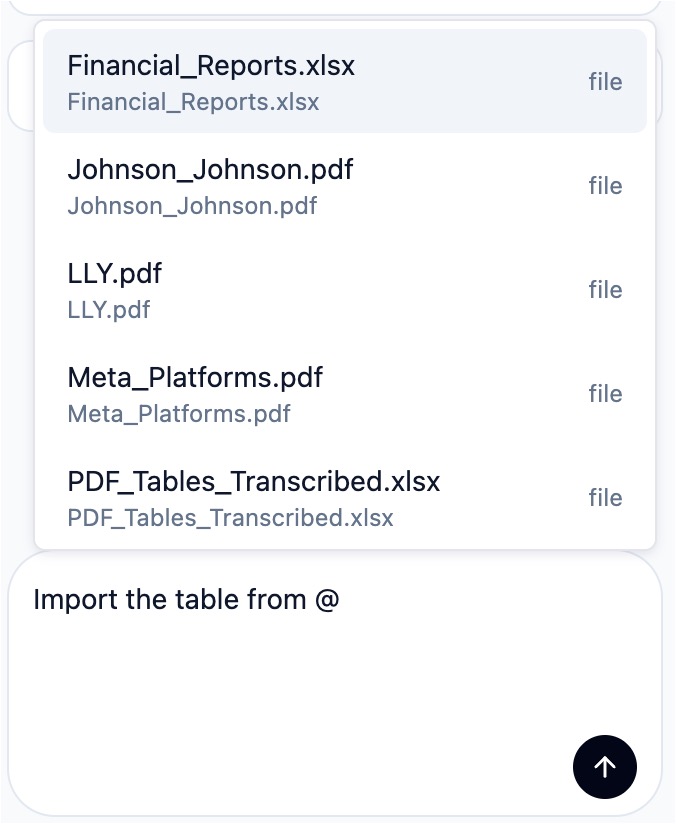
In Strata, you can steer the agent to look at certain elements with "workspace references". Typing @ in the chat window opens suggestions
drawn from the current workspace, so the prompt can point to concrete files and ranges instead of relying
on vague descriptions.
Reference Types
The current workspace reference model in Strata supports files, folders, and ranges.
| Reference | What it points to | Notes |
|---|---|---|
| Workbook | An .xlsx workbook in the current workspace | Useful when the agent should reason over a whole model, not just a single sheet. |
| PDF File | A PDF in the current workspace | Useful when you only want the agent to look at one PDF. |
| Folder | A folder in the current workspace | Useful when the relevant context lives across a set of related files instead of a single document. |
| Current selection | The active range in your open workbook | Best when you want the agent to focus on exactly what is highlighted right now. |
| Range | A range of cells in a workbook | Useful when you want to carry spreadsheet context into the prompt even after moving away from the original selection. You can simply copy and paste any range instead of using the selector menu as well. |
General Tips
The Strata agent is designed to handle casual language, shorthand (memories help here!), and even the occasional typo. Prompts do not need to be written in a rigid or formal way. Treat Strata like your most forgiving coworker.
The best prompts usually combine plain-language intent with explicit workspace references. Tell the agent what you want, then point it to the files, PDFs, or ranges that matter for faster and more accurate results.
Prompting in Strata is iterative. If the model does not get something completely right on the first pass, send a follow-up message to clarify what was wrong, point it to better context, or ask it to try again with a more specific instruction.